Solo build · Live in production · Over-built on purpose · Updated August 2026
It started as a folder. Now it runs the workday.
Designed, built, tested, and operated by one engineer: Chris Sewell.
ItemBridge is an automation project I have spent
nearly two years building. It turns Excel item-request files into
live ERP records with no manual data entry: detection, cleaning,
validation, API import, browser-driven follow-up, AI cross-checking,
and live monitoring. From the outside it is still a single
instruction: a request appears, items appear in the ERP.
0lines of production code
0automated tests
0front-ends
0systems integrated
0months, one pair of hands
The last year had one theme: taking the operator out of the loop,
safely. The system now engages itself every workday morning,
processes what it can prove is clean, hands anything needing
judgment to a pair of smart glasses or a phone, retries what a
colleague left locked, and stands itself down at five, checking the
PTO calendar first. An AI agent can drive it too. And a set of
fail-closed gates guarantees that the things which must never
happen unattended, don't.
It is more system than one spreadsheet pipeline strictly needs,
deliberately: this project is where I practice production
discipline at full depth, on a problem small enough to hold to
that standard completely.
Nov 2024
First commit. A watcher, a folder, an ERP template.
2025
The factory: cleaning, matching, API import, browser follow-up, AI cross-check, a live terminal UI and a first stats dashboard.
May 2026
The queue: SharePoint-sourced review-then-process, a rebuilt web dashboard, scheduling.
Jun 2026
The cloud bucket dies. A LAN mesh takes over: nodes serve each other, the dashboard pulls.
Jul 2026
The self-driving factory: autonomous mode, smart-glasses and phone control, an AI-agent control plane, a 208-agent audit.
Aug 2026
The gatekeeper: every requested code screened against a local mirror of the item master, measured to zero false positives before it shipped.
Two years in: the whole pipeline, answered hands-free on a pair of
smart glasses. How it got there is the rest of this page.
flowchart LR
A[Request lands in SharePoint] --> B[Processed]
B --> C[Items live in the ERP]
classDef simple fill:#1e1b4b,stroke:#a78bfa,stroke-width:2px,color:#f1f5f9;
class A,B,C simple;
The requestor's mental model. Increasingly, nobody pressed anything. Everything that follows is what "Processed" actually means.
02What's actually happening
The headline workflow. A request moves through a freshness-gated
download, a human gate, cleaning, matching, an AI second opinion,
ERP import, and browser-driven follow-up before it is marked
Complete. Eight phases, dozens of decisions, all invisible to the
requestor.
flowchart TB
Start([A request is picked: by the operator, by a schedule, or by the autonomous loop])
subgraph Fetch["1 - Fetch fresh"]
direction TB
F1[Download the xlsx from SharePoint by item id via Graph]
F2{Changed?}
F3[Re-download, up to 3 tries, then fail the row cleanly]
F1 --> F2
F2 -- etag moved --> F3
end
subgraph Gate["2 - Manual-review gate"]
direction TB
G1{Held?}
G2[An operator must assert the review. Anything else stands the batch down]
G1 -- yes --> G2
end
subgraph Clean["3 - Clean & Validate"]
direction TB
C1[Apply operator row overrides]
C2[Strip HTML & problem characters preserve inch and foot marks]
C3[Normalize Product IDs + duplicate detection]
C4[Rebuild structured cable descriptions]
C5[Screen against the item-master mirror]
C1 --> C2 --> C3 --> C4 --> C5
end
subgraph Match["4 - Match"]
direction TB
M1[Manufacturer fuzzy match cache, then ERP, then auto-create]
M2[Item-group resolution]
M1 --> M2
end
subgraph AI["5 - AI check"]
direction TB
A1{Rule fires?}
A2["Skip the API call, audited at $0.00"]
A3[Cache, then blind classifier: web search, no requestor hint]
A4[Disagreements and suspect part numbers prompt a human, on any surface]
A1 -- yes --> A2
A1 -- no --> A3 --> A4
end
subgraph API["6 - Import"]
direction TB
I1[Acquire concurrency permit self-tuning AIMD]
I2[Create items in the ERP]
I1 --> I2
end
subgraph Browser["7 - Automated follow-up"]
direction TB
B1[Cost calc on the ERP web UI]
B2[Mark request Complete in SharePoint, retrying past locks]
B1 --> B2
end
subgraph Done["8 - Done"]
Z1[Ledger + stats + audit trail. The row leaves every queue]
end
Start --> Fetch --> Gate --> Clean --> Match --> AI --> API --> Browser --> Done
classDef extSys fill:#2a1a3d,stroke:#f472b6,stroke-width:1.5px,color:#fce7f3;
classDef decision fill:#1e1b4b,stroke:#a78bfa,stroke-width:2px,color:#ede9fe;
class I2,B1,B2,A3 extSys;
class F2,G1,A1 decision;
The full lifecycle of one request. Pink nodes are external systems:
the ERP, its web UI, SharePoint, the AI provider. Violet diamonds
are the decisions that used to be a person's job.
Freshness gate
The spreadsheet is collaboratively edited, so every download is bracketed by metadata checks. If the file moves mid-transfer it is re-fetched; three strikes and the row fails cleanly with "try again shortly". A half-edited file never reaches the ERP.
Manual-review gate
A configurable list of requestors can never process without an explicit operator acknowledgment. Only the literal answer counts: timeouts, disconnects, and wrong tokens all decline, and a decline stands the whole batch down.
Cleaning
Dozens of rules normalize HTML, special characters, structured cable specs, duplicates, and Product ID format. Bad rows surface for review instead of corrupting the import.
Manufacturer matching
Cascade through local cache, ERP lookup, and fuzzy similarity. The fuzzy scorer is a calibrated composite, swept against 329 operator-confirmed pairs: the right answer is offered 93.9% of the time, up from 84.8%, without losing a single answer the old scorer offered. Unknown vendors get auto-generated IDs and are remembered, and the memory syncs to every other node over the mesh.
Adaptive parallelism
Self-tuning API throughput. Widens on success, halves the moment the server pushes back, then probes upward periodically.
AI check
Deterministic rules answer what they can for free; everything else goes to a blind, web-search-backed classifier that never sees the requestor's pick. Disagreements prompt a human, on whichever surface they happen to be wearing.
03In the background
While the headline flow runs, ten other workers operate
concurrently. Each one was split out for a specific reason: keep
the watcher fast, keep the UI responsive, keep every external
conversation independently tunable.
flowchart LR
Main([System core])
Main --> W1[Graph poller SharePoint registry]
Main --> W2[File watcher generic folder lane]
Main --> W3[Version watcher who touched what]
Main --> W4[Reminder watcher business-minute nag]
Main --> W5[AI matching worker durable queue]
Main --> W6[Browser orchestrator + lock-retry sweep]
Main --> W7[Mesh server + sync peers and dashboard]
Main --> W8[Glasses + agent server HTTP and WebSocket]
Main --> W9[Scheduler tick batches + the clock]
Main --> W10[Presence poller Teams health + PTO]
Main --> W11[Autonomous controller while engaged]
classDef worker fill:#0e2a3d,stroke:#22d3ee,stroke-width:1.5px,color:#cffafe;
classDef ent fill:#1e1b4b,stroke:#a78bfa,stroke-width:2px,color:#ede9fe;
class Main ent;
class W1,W2,W3,W4,W5,W6,W7,W8,W9,W10,W11 worker;
Each worker runs independently, in one process. As an always-on service the full set keeps working with nobody attached; a headless Graph-only mode runs most of it with no UI in the process at all.
SharePoint Graph poller
Polls the request library through Microsoft Graph: light polls every 30 seconds, filtered rescans, and a daily deep re-enumeration that structurally skips the 5,000-item archive folder. Populates the registry every other surface reads.
File watcher
The system's original front door: tails a generic watch folder, waits for files to stop changing, routes them to the right lane. Default-off now that SharePoint took over; the settings screen reports the off state explicitly, so an idle folder is distinguishable from a dead thread.
Waiting-version watcher
Walks SharePoint version history to answer "who touched what": flags Waiting items bumped by someone else, tags rows a watched reviewer has looked at, and diffs file content to catch corrected requests.
Pending-reminder watcher
Nags the operator's phone when an item has needed them too long, counting business minutes only: nights, weekends, and PTO age nothing, so Monday morning doesn't open with a burst of false alarms.
AI matching worker
After each no-AI batch, classifies every item through a crash-safe SQLite queue and writes the audit trail that the health screen, spend tracker, and review workbench all read.
Browser orchestrator
Drives a real browser through the steps the API doesn't expose, serialized so they happen in order. Includes the lock-retry sweep that re-attempts mark-completes a colleague is blocking.
Mesh server + sync
Serves this node's stats and audit artifacts to the dashboard, and syncs operator data with peer nodes: anti-entropy every minute plus instant one-record broadcasts.
Glasses + agent server
One embedded HTTP and WebSocket server hosts the glasses plugin, the phone companion, and the AI-agent REST namespace, in the same process as the terminal UI.
Scheduler tick
Fires scheduled batches and runs the autonomous clock: one-shot arms, the every-workday toggle, the 5pm cutoff, and PTO-aware rescheduling.
Presence poller
Watches a companion presence service for health, and borrows its PTO calendar for every scheduling decision the system makes.
Autonomous controller
While engaged, the eleventh worker: scans, processes, defers, notifies, and yields the pipeline to any human who takes over. More on this below.
The background workers also take slow work off the critical path.
The moment a batch starts, browser pages pre-navigate to the ERP
screens the follow-up will need, in parallel with the cleaning and
the AI check: cost calc measured at 3.2 seconds on a staged page
against 10 to 15 cold, and any doubt about a staged page falls
back to the full cold path, so the optimization can never lose.
The 1,244-record manufacturer master downloads the same way, on a
daemon thread while the pipeline works: 0.733 seconds cold, 0.001
to consume.
04One item, two spellings
The newest gate in the factory. Before any code is created, it is
checked against a local mirror of the ERP's 124,689-row item
master on two axes: exact matches that are already blocked from
purchasing, and formatting twins, the same code with its
punctuation in different places, which the ERP treats as
two unrelated parts, silently splitting purchase history between
them.
flowchart TB
subgraph Mirror["The mirror, off the hot path"]
direction LR
DL[ERP data lake read-only, over SSH] -->|"nightly, hourly while autonomous runs"| DB[(SQLite mirror 124,689 items)]
end
R[Requested Product ID] --> N["Normalize: uppercase, strip interior punctuation, preserve trailing"]
N --> LK{Twin or blocked exact match?}
DB -.->|microsecond lookup| LK
LK -->|"no findings: 89% of requests"| OK[Import proceeds]
LK -->|findings| SUP{Worth a human's time?}
SUP -->|known cable variant| AUTO["Auto-queued for blocking. No prompt"]
SUP -->|yes| H["Operator prompt: five resolutions, apply-to-all"]
H -->|accept requested code| BLK[Superseded twin blocked with the softest signal]
H -->|"timeout, disconnect, garbage"| X[Cancel: the answer fails closed]
classDef extSys fill:#2a1a3d,stroke:#f472b6,stroke-width:1.5px,color:#fce7f3;
classDef worker fill:#0e2a3d,stroke:#22d3ee,stroke-width:1.5px,color:#cffafe;
classDef decision fill:#1e1b4b,stroke:#a78bfa,stroke-width:2px,color:#ede9fe;
classDef done fill:#052e29,stroke:#34d399,color:#d1fae5;
classDef bad fill:#3b0a0a,stroke:#f87171,color:#fee2e2;
class DL extSys;
class DB,AUTO worker;
class LK,SUP decision;
class OK,BLK done;
class X bad;
One gate, two failure directions. Everything about the gate itself
fails open, because it is an assist. The operator's answer fails
closed, because it is a decision.
A mirror, not a query
The ERP is never asked on the hot path. A SQLite mirror of the item master refreshes over SSH from the ERP's data lake, nightly plus hourly while autonomous mode is running, so the gate answers in microseconds and the 13.2 second full pull happens where nobody is waiting.
Formatting twins
TQ-4310-MSA and TQ4-310MSA are the same part with the hyphens in different places. Normalization uppercases and strips interior punctuation but preserves trailing punctuation: an earlier version that stripped it too produced the feature's only false positive. Across the full master: 1,443 collision clusters, 2,891 codes, 2.3%.
Measured before shipped
The normalization floor was chosen by replay, not intuition: at length eight, zero false positives over all 124,689 rows. Against 471 real requests, 89% raise no findings at all, and a tail of seven raised 8 to 88 each, which is exactly why apply-to-all resolutions exist.
An assist, not an interlock
A stale mirror or a failed lookup never blocks an import; the gate simply says nothing, and says so in the log. The one thing that fails closed is the operator's answer: timeout, disconnect, and garbage all mean cancel. Autonomous mode defers the item before any side effect.
Retiring the backlog
A separate sweep works the other direction: 1,021 duplicate pairs already living in the master, 956 with purchase history split across both spellings. The script is read-only by default, probes before every write, keeps a resumable ledger, and re-verifies each pair at write time.
The governing rule is one sentence: a created code never deviates
from what the requestor typed unless a human explicitly approves.
Twins, suggestions, and normalizations are all advice. The import
spells it the requestor's way until a person says otherwise, and
accepting an existing twin instead is a choice a human makes,
never a correction the pipeline applies.
Try the gatethe real rules against a 12-row synthetic item master
normalized key
The gate's first two days taught the lesson that mattered most.
Every one of its 136 findings was the same pattern: a
made-to-order cable spelled with a hyphen against its legacy twin
spelled with a period. So the gate learned suppression: a twin
already carrying any human-set signal is never worth a prompt, and
the known cable variant is queued for blocking instead of asked
about. The suppression is directional, so a legacy-spelled request
still prompts and the pipeline can never mint a new legacy
duplicate. Replaying the real findings log, 175 prompts became 11.
A gate that cries wolf teaches its operators to stop reading; the
fix is judgment, not volume.
05When things go wrong
The ERP has bad days, colleagues leave files open in Excel,
requestors rename things mid-flight. The system's answer is always
one of three: absorb it, retry it on a clock, or fail closed and
say so. Nothing is silently lost, and nothing risky proceeds on a
guess.
The freshness gate
flowchart LR
A[Metadata check before download] --> B[Download xlsx]
B --> C[Metadata check after download]
C -->|etag unchanged| OK[Import this copy]
C -->|etag moved: someone is editing| B
C -->|3 attempts| X["Fail the row cleanly: 'try again shortly'"]
A -->|item gone| X
classDef done fill:#052e29,stroke:#34d399,color:#d1fae5;
classDef bad fill:#3b0a0a,stroke:#f87171,color:#fee2e2;
class OK done;
class X bad;
Requests are collaboratively edited spreadsheets. Every batch download is bracketed by metadata checks so a file being edited at that exact moment fails one row cleanly instead of importing a half-saved frame.
The lock problem
flowchart LR
A[Mark request Complete in SharePoint] -->|a colleague has the file open in Excel| L[Rejected: locked]
L --> N[One phone alert, edge-triggered]
L --> R[Auto-retry sweep every 2 minutes]
R -->|file renamed?| RE[Re-resolve the current name via Graph, then retry]
RE --> R
R -->|colleague closes the file| OK[Complete + one all-clear push]
classDef done fill:#052e29,stroke:#34d399,color:#d1fae5;
classDef bad fill:#3b0a0a,stroke:#f87171,color:#fee2e2;
class OK done;
class L bad;
A finished request that can't be flipped to Complete would sit looking unprocessed. Instead it retries on a clock, survives renames by re-resolving the current filename, and tells the operator's phone exactly once when it gets stuck and once when it recovers.
Adaptive parallelism
flowchart LR
Win[20 successes in window] -->|+1 permit| Limit[Permit limit]
Limit --> Calls[Parallel calls]
Calls -->|429 or reset| MD[Halve it + cool-off]
MD --> Limit
Probe[Periodic upward probe] --> Limit
Walks ERP parallelism up gently on success, halves it the moment the server pushes back, and honors the server's own cool-off requests. Deliberately per-machine: a safe ceiling is a property of the local network path, so it is learned locally.
Durable AI queue
Classification work survives a crash: the queue is SQLite on disk, and rows stuck in progress reset to pending on the next startup. No item silently loses its second opinion.
API retries + token refresh
ERP create calls retry with backoff, and the auth token refreshes mid-batch instead of failing a long run on an expired session.
Failure-store hygiene
After every full rescan the failure list is reconciled against reality: failures for requests that were completed or renamed out from under them are auto-dismissed, and dismissals are tombstoned so a late echo can't resurrect a row a human just cleared.
Fail closed
Every ambiguous answer resolves to the safe side. Prompt timeouts decline, unknown requestors hold, a disconnected glasses link is a "no". The dangerous default is the one thing the system never takes.
Registry self-heal
Deleted, renamed, moved, and re-uploaded SharePoint items are detected and pruned on the next rescan. Schedules for pruned items are tombstoned rather than deleted, so a peer node can't accidentally resurrect them.
No false Completes
A declined batch imports nothing at all, and a failed row simply stays in the queue for another attempt. A request is never marked Complete in SharePoint unless its items actually landed in the ERP.
It doubts its own ledger
Success reports are not trusted either: recorded completions are re-verified against reality on every full rescan, and one that proves false reopens as a retryable failure. The retry sweep arms at boot, not on first use; manual retries keep their attempt history; the lifetime done counter is a real counter, not the length of a capped ring.
06Autonomous mode
Press one key, or let the clock do it. Autonomous mode processes
the queue exactly like the operator's AI-checked flow, one item at
a time, and never blocks on a question: anything that would need
human judgment is set aside, flagged, and pushed to the operator's
phone with the reason in the title.
flowchart TB
E([Engaged: a key, the glasses, a schedule, the daily toggle, a restart, or an agent])
E --> S[Scan the queue for eligible items]
S --> P[Process one item through the full pipeline]
P -->|clean run| OK[Complete + low-priority push]
P -->|any prompt would surface| D["Defer: flag needs-you, push 'Needs you: reason'"]
OK --> S
D --> S
H[A human takes over, glasses or terminal] -.->|loop pauses after the in-flight item, then resumes| S
S -.->|5pm Eastern: finish in-flight, sweep late corrections| Z[Stand down, re-armed for tomorrow]
classDef done fill:#052e29,stroke:#34d399,color:#d1fae5;
classDef bad fill:#3d2a0a,stroke:#fbbf24,color:#fef3c7;
classDef ext fill:#2a1a3d,stroke:#f472b6,color:#fce7f3;
class OK done;
class D bad;
class H,Z ext;
The loop never answers a prompt. Clean items run to Complete;
anything that would ask a question is deferred with a durable flag
and skipped until something about it changes.
One seam, every prompt
Engaging flips a single switch in the prompt broker. Any of the eleven prompt types, raised anywhere in the pipeline, becomes a deferral at one chokepoint, including prompt types that don't exist yet.
It never guesses
Prompt defaults are unsafe unattended: a manufacturer-match default would create a new manufacturer. So the loop answers nothing, defers the item, and moves on. No retry until something changes.
The clock
A recurring toggle engages every non-PTO workday at 8am. The 5pm cutoff finishes the in-flight item, sweeps for late corrections, then re-arms tomorrow. PTO comes from the operator's real calendar, checked again at fire time.
Stop means today
A manual stop stands autonomous down for the rest of the day without cancelling the daily toggle. Tomorrow runs; today stays stopped. That third state has its own day-stamped marker, because "stop" and "never again" are different requests.
Restart resume
If the process dies mid-run it comes back in the same mode, but only same-day: the intent is day-stamped, so a Monday restart can't replay Friday's decision.
Phone pushes
Deferrals and failures push to the phone with the reason in the title, because the glasses mirror truncates bodies: "Needs you: AI MPN suspect" survives truncation where a paragraph would not. Completions push a quiet, low-priority all-clear.
Forced on means forced on
A durable override for the run that must span a weekend: while set, the loop ignores the 5pm cutoff, weekends, PTO, and restarts, until someone deliberately stops it. It never bypasses the prompt interlock, and deferral pushes are muted on off-days: deferred items still queue and flag, the phone just stays quiet until the workweek.
Deferred items carry a durable flag and a reason, and can be
handled from the terminal, the glasses, or the phone: the loop
pauses after its in-flight item, yields the pipeline to the human,
records the outcome as "handled by you", and resumes. A separate
reminder watcher re-pings every thirty business minutes until
nothing needs you. And when a parked request gets corrected, the
loop notices fast: the poller pokes the content watcher the moment
an edit lands, so worst-case pickup fell from about five and a
half minutes to about 35 seconds, floored at one wake per 15
seconds after an unthrottled stress test measured 486 wakes per
second.
07On your face, in your pocket
The third front-end is a pair of Even Realities G2 smart glasses,
with the phone companion as its second screen. Everything the
pipeline can ask, the operator can answer hands-free: browse the
queue, process batches, resolve every prompt, handle deferrals,
edit rows, watch the live log.
flowchart LR
subgraph Phone["Phone, on the VPN"]
G[Glasses HUD 576 x 288 greyscale]
P[Phone companion same state machine]
end
Phone <-->|WebSocket + REST| S[Embedded server inside the ItemBridge process]
S <--> RPC[Remote prompt consumer]
RPC <--> Q[Prompt broker first answer wins]
Q <--> PL[Processing pipeline unchanged]
classDef ext fill:#2a1a3d,stroke:#f472b6,color:#fce7f3;
classDef core fill:#1e1b4b,stroke:#a78bfa,stroke-width:2px,color:#ede9fe;
class G,P ext;
class Q,PL core;
The pipeline never learned the glasses exist. It asks its questions
through the same thread-safe prompt broker the terminal uses; a
consumer marshals them over a WebSocket, and the first answer from
any surface wins.
Eleven prompts, hands-free
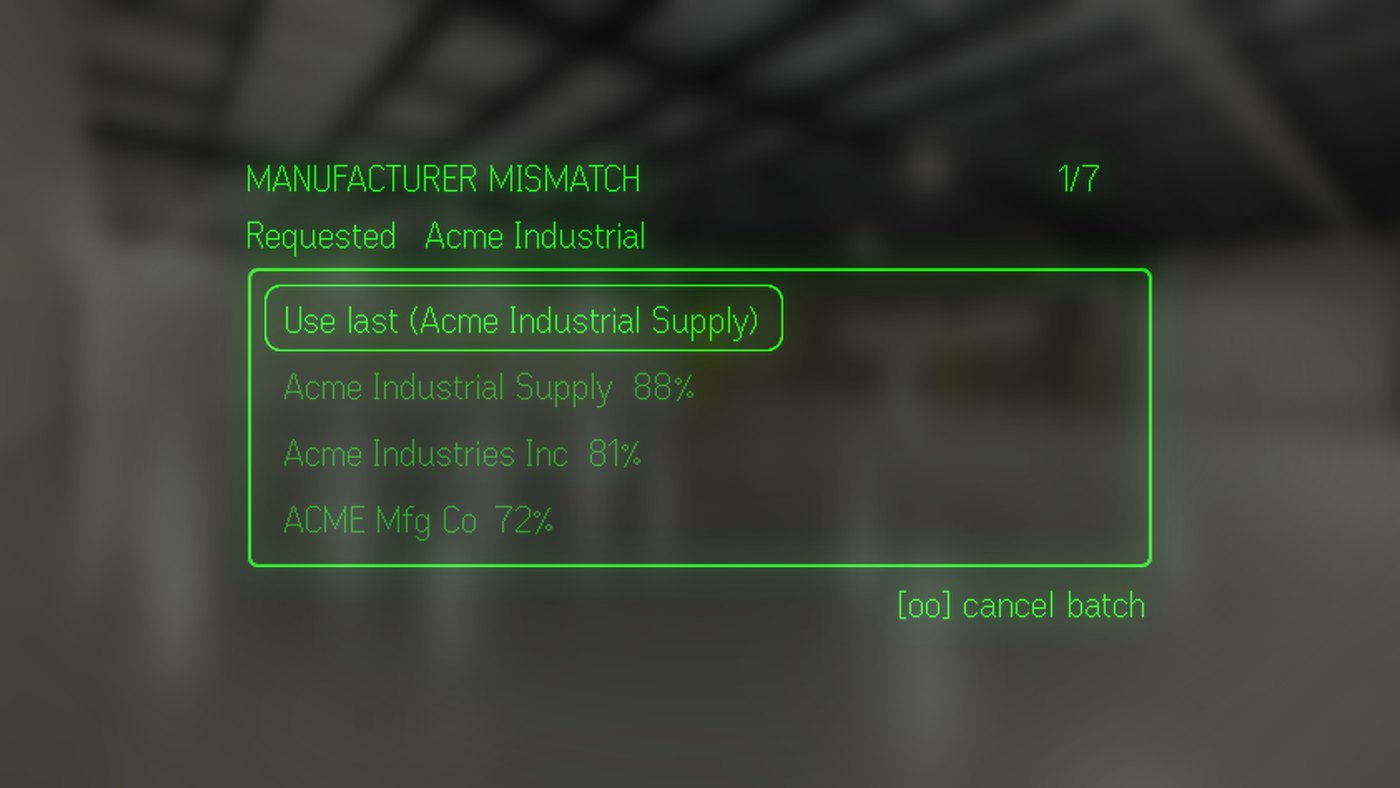
Every interactive prompt the pipeline raises renders natively on the glasses: manufacturer match, item-group mismatch, duplicates, suspect part numbers, the item-master twin resolutions, and the manual-review gate, where only the literal "reviewed" acknowledges and a bare back gesture declines.
A 576 by 288 canvas
The display is greyscale, proportional-font, and unforgiving. Text is pixel-measured, never character-counted; non-ASCII glyphs outside a seven-character allowlist are coerced before they can vanish; and a screen holds at most eight native containers, because a ninth makes the firmware silently refuse the frame.
One state machine, two screens
The phone companion is not a status mirror: it is the same state machine projected twice. A phone tap emits a wire message byte-identical to the equivalent glasses gesture, proven by tests that diff the actual sends.
First answer wins
Glasses, phone, terminal, and agent all answer through one broker. The first resolution wins; the phone view that just lost its prompt explains itself with a banner: "Answered on the glasses".
A live log on your face
Tap the busy screen for a live tail of the action log: a seven-row window with pixel-budgeted lines, tail-follow, and a sticky level filter shared with the phone through one durable preference.
It ships itself
Publishing a new build is one command: a headless browser logs into the vendor hub, reads the current version, bumps, packs, uploads, writes the changelog from git, and promotes to Beta. The phone just taps Update.
A stray tap does nothing
The firmware parks its highlight on row 0 after every screen rebuild, so row 0 is always Back and any mutation takes two deliberate presses: a rule bought by a real stray tap that once paused presence for two hours. Dropped frames are detected too, and a gesture aimed at a screen the glasses provably are not showing is rejected and healed by a repaint instead of firing blind.
Presence, self-expiring
Teams presence can be paused or forced on from the glasses, phone, terminal, or CLI. Every override self-expires on the far side, which is what makes it safe on a heads-up display: a lost command decays into a stale label, never a stuck state.
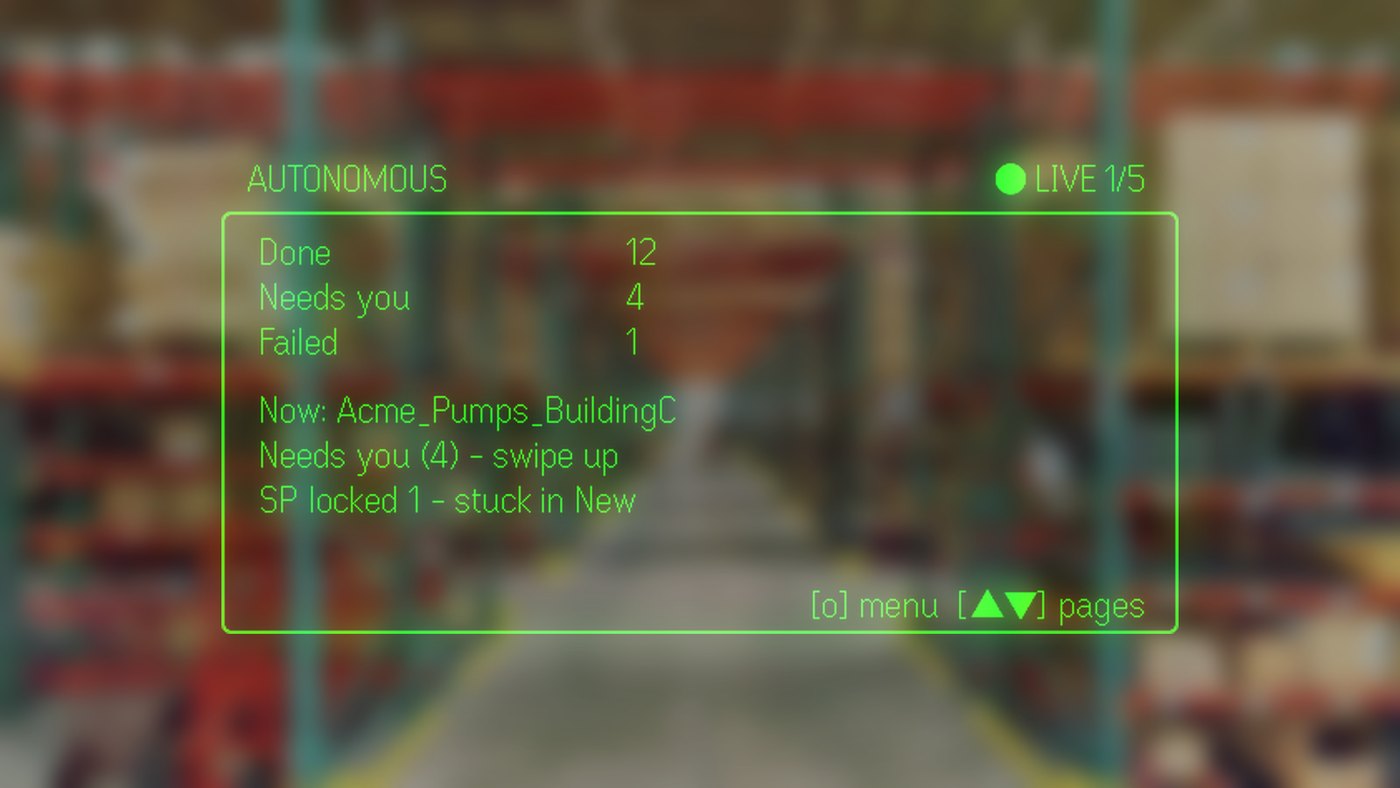
The unattended run, reporting in.
One of eleven prompt types, answered without a keyboard.
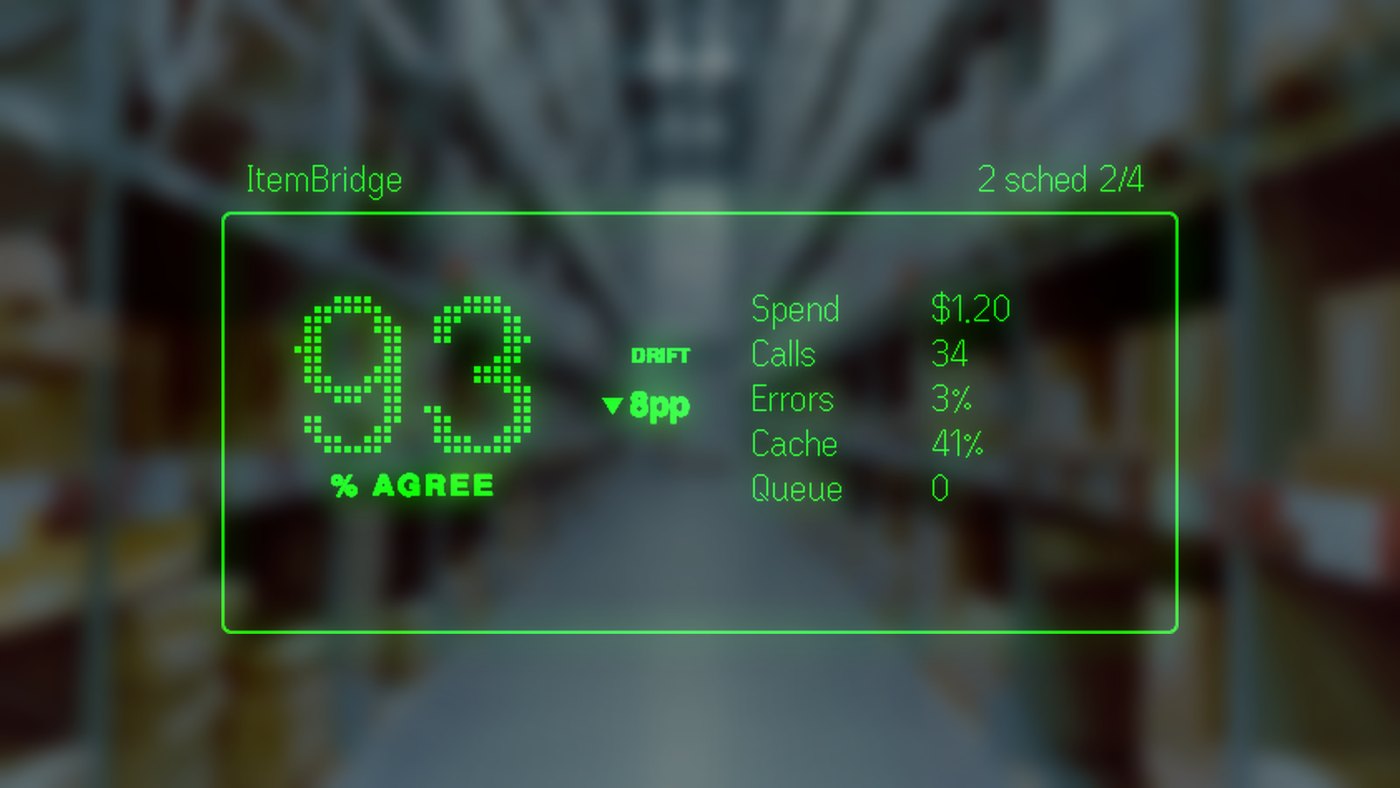
The surface is substantial: 44 screens, around 30 wire message
types, with the contract verified from both languages against
shared fixtures, and over 1,000 dedicated tests. Its two images
are spent well: a dot-matrix agreement gauge for the AI check,
drawn into a 276 by 137 pixel budget, which had to beat its own
text fallback in a side-by-side capture to earn the slot, and a
provider-latency sparkline drawn pixel by pixel, because the
firmware's glyph set has no block characters to type one with.
08A third kind of operator
The newest operator is not a person. A REST control plane and a CLI
let an AI agent read everything the terminal shows and do most of
what the operator can: answer prompts, run batches, triage
failures, engage autonomous mode. Every action leaves an audit
line.
flowchart LR
A[AI agent CLI or REST] --> Q{Prompt broker first answer wins}
T[Terminal modal] --> Q
G[Glasses tap] --> Q
Q --> W[Winner resolves the prompt]
Q --> L[Losers: modal dismissed, late answers are no-ops]
classDef core fill:#1e1b4b,stroke:#a78bfa,stroke-width:2px,color:#ede9fe;
classDef ext fill:#2a1a3d,stroke:#f472b6,color:#fce7f3;
class Q core;
class A,T,G ext;
Same broker, same rules. An agent's answer dismisses the modal the
human was looking at; a losing answer is a clean no-op, not a
conflict.
Read everything
Dashboard state, every pending item with its flags, parsed line-item rows, every open prompt with its full evidence and the exact vocabulary of valid answers, logs, jobs, deferrals, schedules.
Act with guardrails
Processing runs as pollable jobs, one at a time; a second request gets "busy", not a race. Malformed answers get the valid vocabulary back, not a stack trace.
Autonomy tiers
The agent's own operating manual defaults to investigate-only. Acting requires an explicit ask, and bulk work carries stop-losses: halt on the first surprise, skip anything the rules don't decisively cover.
An audit line per action
Every accepted mutation writes an "agent-ctl:" line into the same action log the operator reads. Who did what is never a mystery.
Every other prompt asks the agent for a judgment. The manual-review
gate asks for an assertion about the physical world: that a human
has reviewed this request. An agent cannot truthfully make that
assertion, so it is never allowed to answer, at any autonomy tier.
Doing nothing is safe by construction: the prompt times out, the
batch stands down, and the rows stay in the queue.
09The mesh
The cloud bucket is gone. Every node runs a small embedded server;
the dashboard pulls what it needs, peers sync what they share, and
an always-on hub bridges machines that are never awake at the same
time.
flowchart TB
A[Watcher node A embedded mesh server] <-->|peer sync: 60s anti-entropy + instant broadcast| B[Watcher node B]
A <--> H[(Always-on hub store and forward)]
B <--> H
D[Web dashboard] -->|pulls artifacts, ETag + 304 on unchanged| A
D --> B
classDef op fill:#1e1b4b,stroke:#a78bfa,color:#ede9fe;
classDef cloud fill:#2a1a3d,stroke:#f472b6,color:#fce7f3;
class A,B op;
class H,D cloud;
Discovery is zero-config on the LAN, with a static peer list as
fallback. Nothing uploads anywhere: stats are served where they are
produced and pulled where they are read.
Pull, not push
The dashboard pulls eight kinds of artifacts from each node: processing stats, AI audit and resolutions, shadow comparisons, calibration, runtime state, template offenders, schedules. Content-hash ETags make an unchanged poll nearly free.
Four shared datasets
Manufacturer picks, item-group picks, per-row overrides, and schedules sync peer-to-peer. A decision made on one machine carries to the next within a minute, or instantly via broadcast.
Never online together
Operator machines come and go. The always-on hub is a full mesh peer that stores and forwards: one node pushes a match and powers off, another boots later and pulls it.
Fleet views
A peers screen in the terminal and a nodes page on the dashboard show every discovered node with live status, so "is the other machine running?" is a glance, not a guess.
10The economics of the AI check
The AI second opinion earns its keep by knowing when not to run.
Deterministic rules answer what a regex can prove, cache answers
what was asked before, and the paid call is reserved for genuine
judgment.
flowchart LR
R[Every request row] --> S1{Suffix override?}
S1 -->|yes| Z1["Decided by rule, $0"]
S1 -->|no| S2{"Custom-cable rule? 61% of rows"}
S2 -->|yes| Z1
S2 -->|no| S3{Cache hit?}
S3 -->|yes| Z2["Served from cache, $0"]
S3 -->|no| L[Paid web-search classification]
L --> G["Gate scores the verdict; disagreements prompt a human"]
classDef free fill:#052e29,stroke:#34d399,color:#d1fae5;
classDef paid fill:#2a1a3d,stroke:#f472b6,color:#fce7f3;
classDef decision fill:#1e1b4b,stroke:#a78bfa,stroke-width:2px,color:#ede9fe;
class Z1,Z2 free;
class L paid;
class S1,S2,S3 decision;
Every row is still audited, including the free ones at $0.00, so
the spend screen shows exactly what the rules are saving.
The cable rule
Made-to-order fibre cable is 61% of classified rows, and its part number encodes both answers: the vendor prefix names the manufacturer, the length suffix proves the item group. Before the rule, 72% of all AI spend and 484 minutes of API latency went to confirming what a regex knew: 1,238 rows classified, zero disagreements.
Shadow mode
Every primary call can fire a silent parallel call to a second provider, logged separately. Measured over 261 pairs: 96.6% agreement, about 6% cheaper, 27% faster, with 74% of calls landing warm in the prompt cache. The provider flip waits for more data, on purpose.
Free part-number validation
The deep call already judges whether the requested Product ID is a real manufacturer part number. Roughly one row in eighteen isn't: vendor SKUs and catalog numbers raise an operator prompt with a suggested correction, at zero incremental cost.
Cache that invalidates itself
Responses are cached under a key that includes the prompt version, so bumping the prompt silently invalidates every stale entry. No flush step to forget. Measured under the current prompt, the local response cache answered 34.5% of classifications at $0: 781 of 2,262, roughly $28 of calls never made.
Health and drift
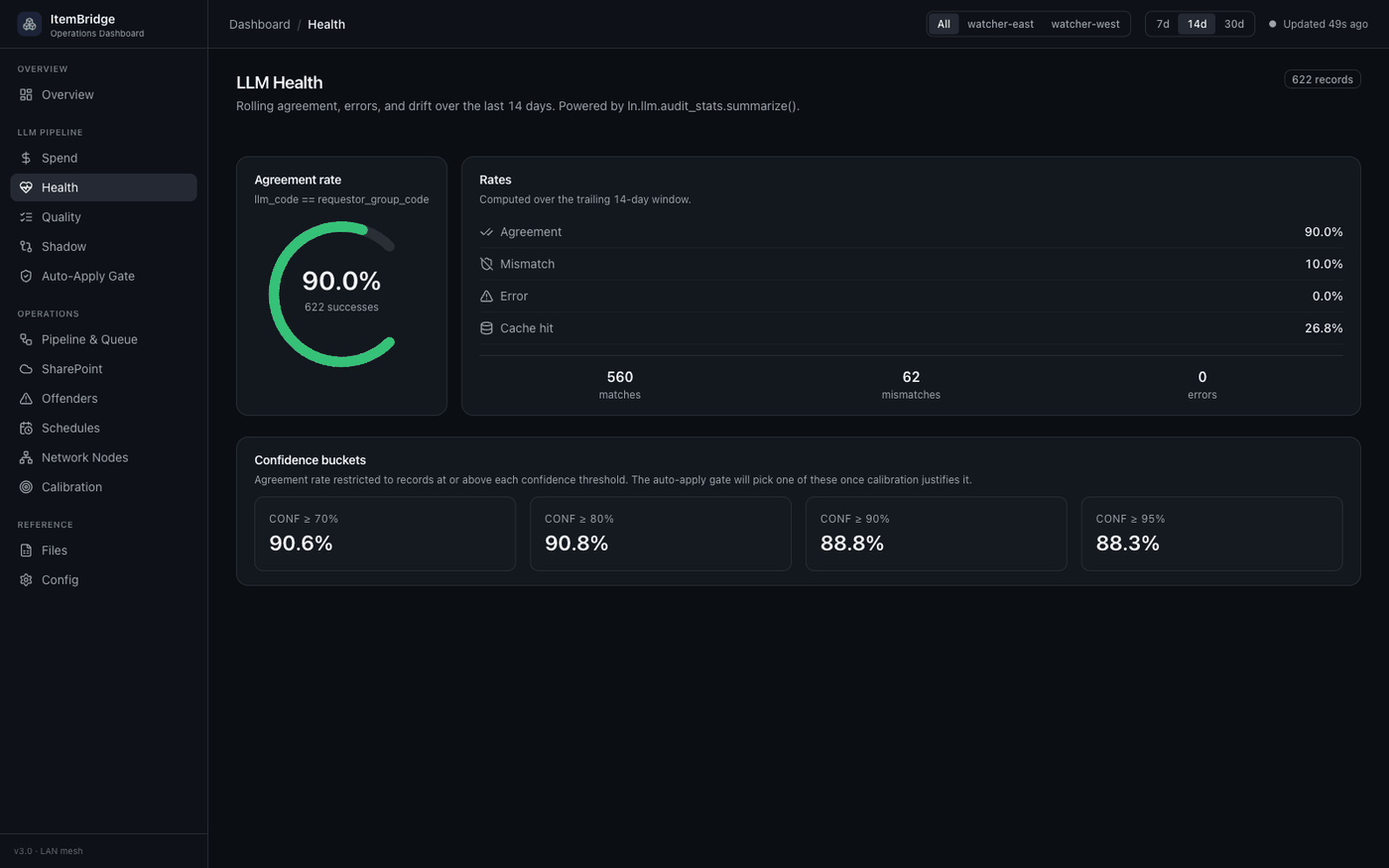
A live screen tracks rolling agreement, error, and cache rates, and raises a banner when recent agreement drifts five points from baseline: the early-warning system for silent model or prompt regressions.
The review workbench
Every AI finding is triaged in one screen: verdicts, notes, and a "handled" state, all written to a never-rotated sidecar that outlives log rotation. An export bundles the human notes with the audit records as input for prompt tuning.
Latency is a health signal
A real provider slowdown, median 21 to 37 seconds and p90 from about 30 to 145.6, with zero rate-limit responses, was once completely invisible: batches just "felt slow". Percentile latency now lives on the dashboard, the terminal, the phone, and a fifth glasses page. Cache hits are excluded from every figure, a missing number renders as a gap and never as zero, and today is compared against a baseline that excludes today.
One deliberate restraint: an enforcement gate scores every verdict
for auto-apply and records the decision in the audit, but changes
nothing yet. Behavior flips only when calibration data proves the
threshold, because "the AI silently overrides the requestor" is a
feature you get to ship exactly once.
11The systems we touch
Ten external systems. Each is a separate authentication, a
separate failure mode, and a separate vocabulary the system
translates between in real time.
flowchart LR
Center((ItemBridge))
Center --- I1[ERP API item + manufacturer create and lookup]
Center --- I2[ERP web UI cost calc, manufacturer import]
Center --- I3[SharePoint list UI mark-complete]
Center --- I4[Microsoft Graph polling, downloads, version history]
Center --- I5[AI provider web-search classifier]
Center --- I6[Second AI provider silent shadow comparisons]
Center --- I7[Phone push service needs-you alerts]
Center --- I8[Presence service Teams health + PTO calendar]
Center --- I9[Glasses vendor hub automated publish]
Center --- I10[ERP data lake item-master mirror, over SSH]
classDef center fill:#1e1b4b,stroke:#a78bfa,color:#fff,stroke-width:2.5px;
classDef ext fill:#2a1a3d,stroke:#f472b6,color:#fce7f3;
class Center center;
class I1,I2,I3,I4,I5,I6,I7,I8,I9,I10 ext;
Every external system has its own client, its own retry behavior, and its own data model. The system is essentially a translator with ten dialects.
12What the operator sees
One system, four front-ends. Each surface shows the same truth at a
different distance from the keyboard.
Terminal
The TUI
22 full screens and 11 modal workflows: queue, review workbench, AI health, failures, offenders, settings, peers, autonomous. Runs as an always-on service; attach a live view over SSH, detach, and it keeps working.
Browser
The web dashboard
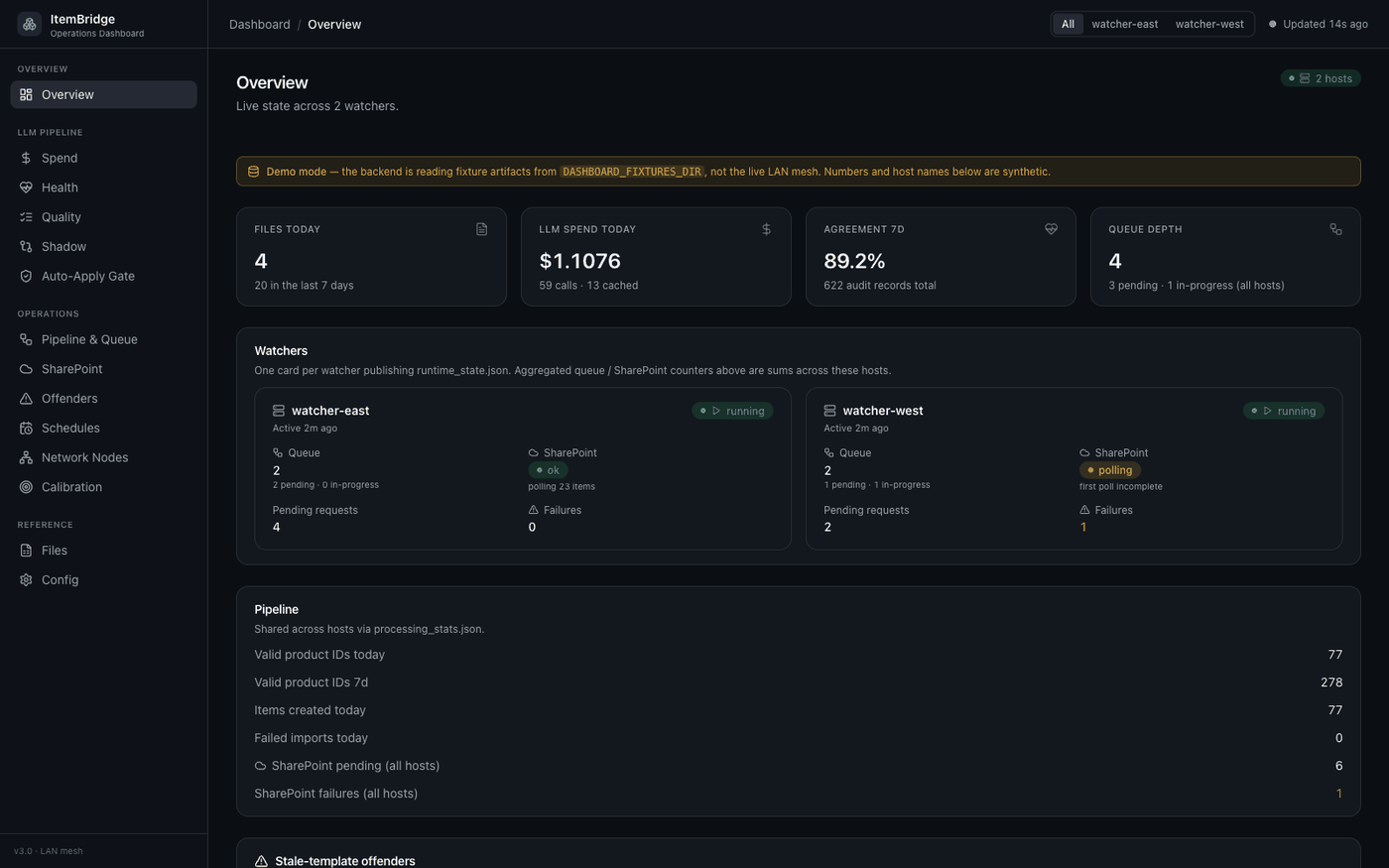
Twelve pages of fleet-wide stats pulled over the mesh: overview, pipeline, per-file drill-downs, provider latency percentiles, nodes, the offender leaderboard, calibration. In-app login, runs on its own box.
Wearable
Glasses + phone
The full control surface on a heads-up display, with the phone carrying what the glasses can't: full rationales, every evidence URL, full-field row editing.
Machine
Agent CLI + REST
25 routes and 21 CLI subcommands for reading state, answering prompts, and driving batches as pollable jobs. Built for an AI operator, usable by curl.
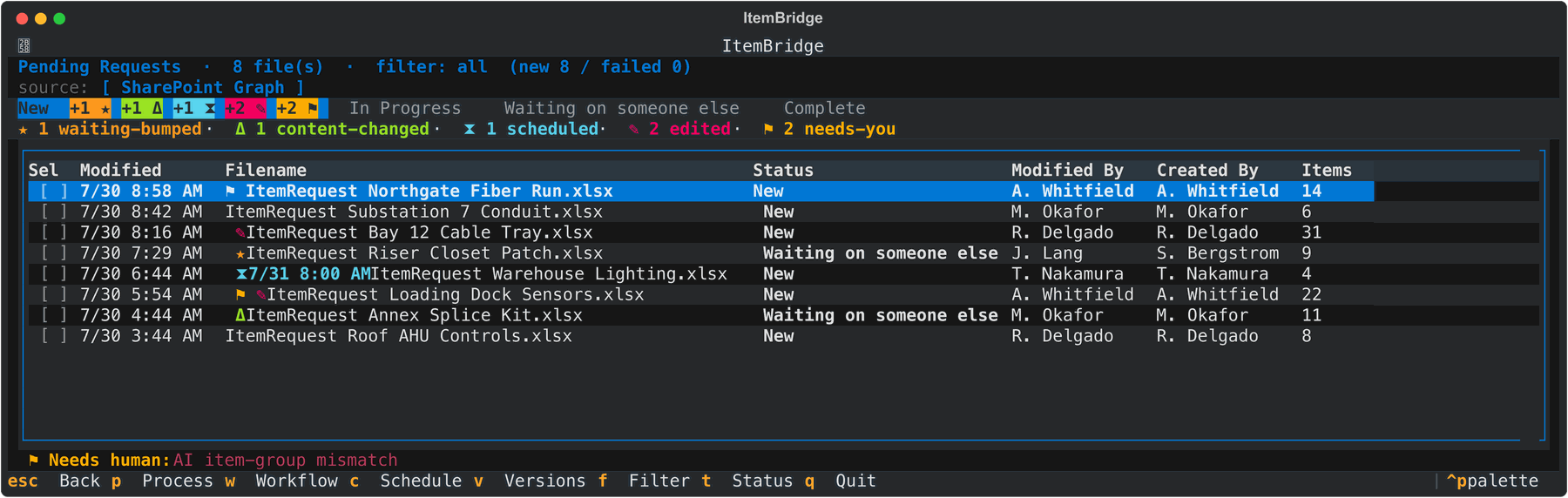
The terminal queue. Every coloured prefix is a different watcher
having noticed something, and the legend under the tabs is rendered
from the same tally as the row markers so the two can never disagree.
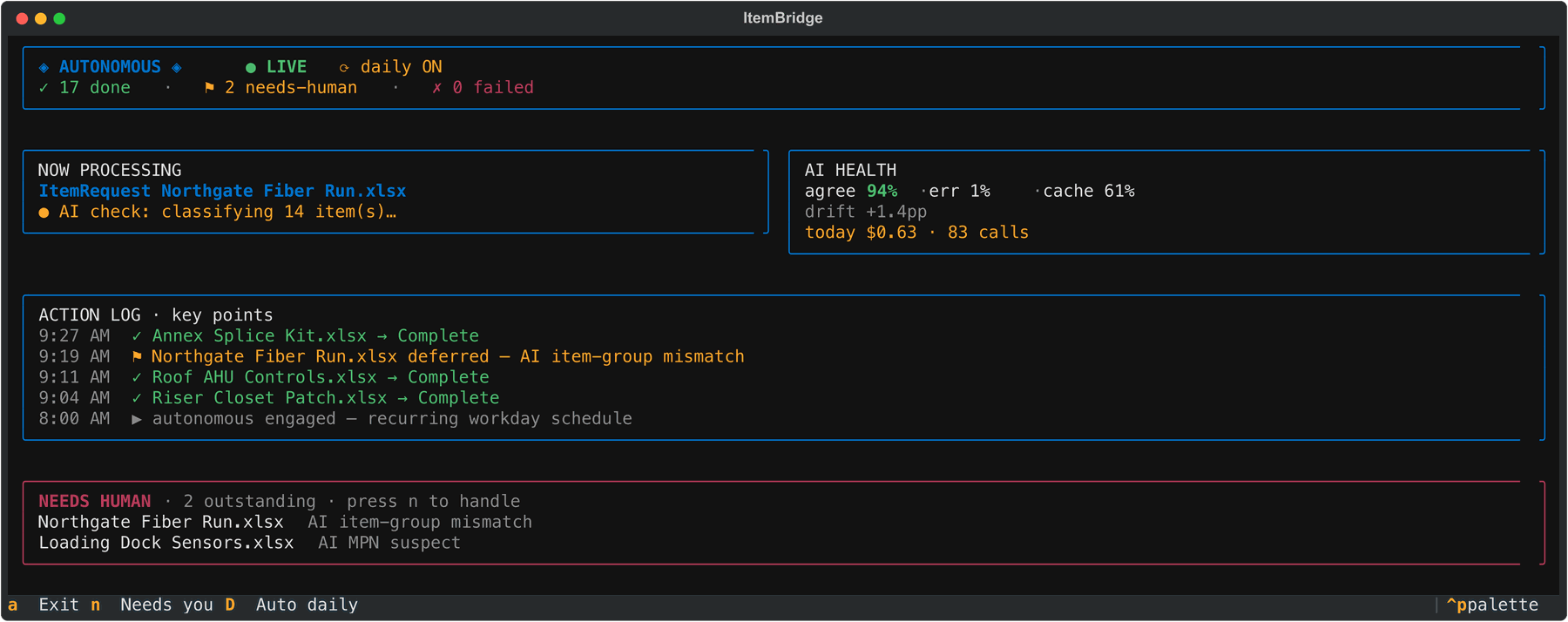
Autonomous mode mid-run. It engaged itself at 8am on the recurring
workday schedule, and the two items it could not decide are waiting,
named, with reasons.
The fleet view, pulled over the mesh.
The calibration data the enforcement gate waits on.
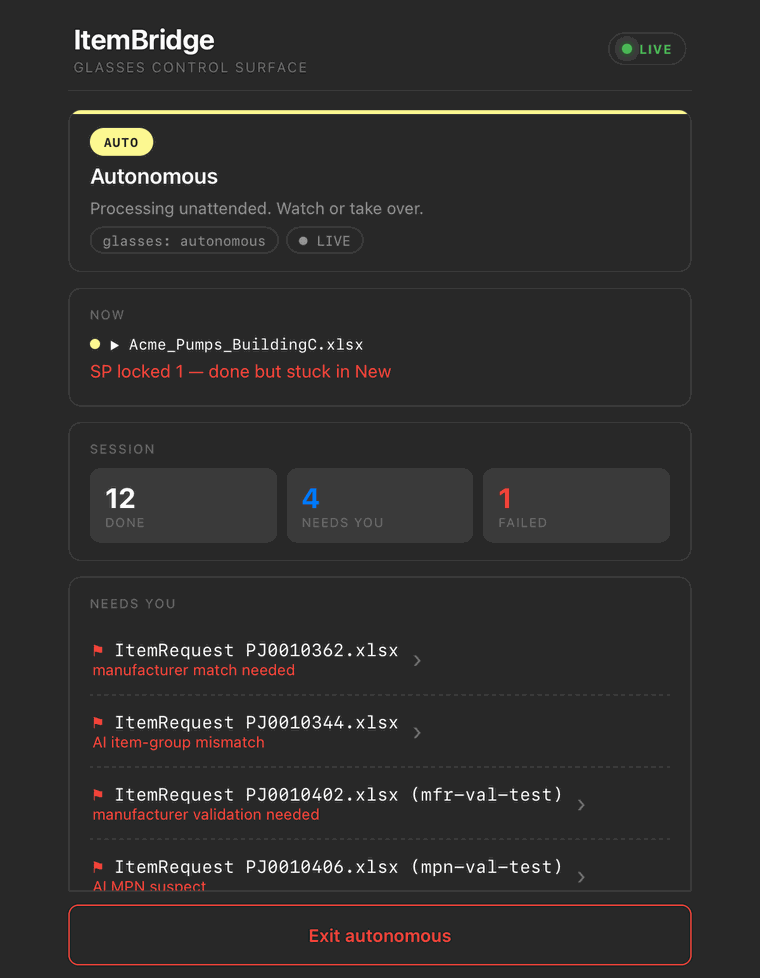
The phone companion. Not a status mirror: it is the same state
machine projected twice, and a tap here emits the identical wire
message the equivalent glasses gesture would have sent.
tuiPending Requests
The queue, wearing its signals: waiting-bumped, reviewer-visited, content-changed, override-edited, scheduled, needs-you.
tuiMismatch workbench
Every AI finding triaged: verdicts, notes, handled state, durable across restarts and rotations.
tuiAI health
Rolling agreement, error, and cache rates, with drift alerting.
tuiSharePoint failures + activity
Mark-complete triage with retry and dismiss, next to the success ledger.
tuiwebOffender leaderboard
Which requestors keep uploading the stale template, by time window.
tuiSettings / status
What this node is configured to do, and what it will actually do next.
tuiwebPeers / nodes
Every discovered mesh node with live status.
tuihudAutonomous + needs-you
The live session face and the deferral queue, on the terminal and on your face.
tuihudLive action log
The same stream on every surface, with shared sticky filters.
agentibctl
state · prompts · answer · process · jobs: the whole system as a CLI.
13The system that audited itself
In July 2026 the whole repository went through a full audit by a
fleet of AI agents with blind adversarial validation, followed by a
remediation program that closed every confirmed finding.
Blind validation
Every finding went to a validator that saw only the claim, never the finder's reasoning, and was instructed to refute it. Critical claims needed two independent confirmations. 208 agents and roughly 4,300 tool calls in total.
What it found
153 findings, 133 confirmed, including two critical money-path bugs: same-named batch downloads silently overwriting each other before import, and requests marked Complete in SharePoint without having been imported at all.
Remediated to zero
155 findings fixed across roughly 30 gated pull requests, each with regression tests proven to fail at the merge base. A closure sweep then re-validated every critical and high finding on the merged result: zero cross-fix regressions.
The blind layers caught more than a dozen real defects that green
test suites had missed. The lesson generalizes: tests confirm what
you thought to check; an adversary paid to disagree finds what you
didn't.
The habit stuck. Later sweeps caught the test suite sending 17
real phone pushes to the operator on every full run, through one
leaked global, now zero and held there by a network tripwire, and
a documented read-only probe that truncated the live service's
action log simply by importing the codebase. Same lesson at
smaller scale: the system's own tooling is part of the attack
surface.
14By the numbers
A quantitative read on the system. All counts taken directly from
the codebase, August 2026.
Scroll for earlier months · hover or tap a day for its count
1,034 commits · Nov 2024 to Aug 2026commits/day01-23-56-1112-2425+
Every merge is one commit here, so a single cell can be a week of
work, and pruned branches drop out of the count over time. The
2026 ramp is autonomous mode, the glasses, the mesh, and the dupe
gate landing back to back.
0
Lines of production code roughly 240k with the test suite
0
Automated tests Python + TypeScript
0
Front-ends terminal, web, glasses + phone, agent API
0
External systems integrated
0
Screens on a pair of glasses 576 x 288, greyscale
0
Of AI-check rows now decided by a $0 deterministic rule
0
Configuration flags for tuning every behavior
0
Merged pull requests merge + squash merges both counted; 981 commits over 21 months
15From drop to done
A request lands in SharePoint overnight. At eight the next morning
the system engages itself, having first checked the PTO calendar.
It downloads the file through a freshness gate, holds it if the
requestor is on the review list, cleans it, checks the requested
code against a local mirror of the item master, matches the
manufacturer, lets a rule or a blind classifier second-guess the
item group, imports it under a self-tuning permit, drives a real
browser through cost calc, and marks the request Complete,
retrying past the colleague who had the file open. The one item
that needed judgment is waiting on your glasses, reason in the
title, evidence one tap away. At five it finishes what it started,
sweeps for late corrections, and arms itself for tomorrow. By the
time you look up, the queue is empty, and the log says exactly who
did what: you, the loop, or the agent.
Why build it like this
A spreadsheet importer does not need fail-direction analysis on
every gate, percentile latency baselines, or a 208-agent
adversarial audit. This one has them because the project is my
practice field for production discipline: decide which way every
failure falls before it ships, measure before changing anything,
and pay an adversary to disagree. The scope is deliberately small
so the standard never has to be.
What building it took
Systems design · one prompt-broker seam, four front-ends, zero pipeline changesIntegration engineering · SOAP, REST, Microsoft Graph, two browser-automated UIsDistributed systems · a peer-to-peer LAN mesh with anti-entropy syncLLM engineering · caching, shadow evals, drift alerting, rule-first cost controlConstrained UI · pixel-budgeted rendering for a 576 x 288 micro-LEDAutonomy & safety · fail-closed gates, defer-first unattended operationTest engineering · 6,400+ tests, cross-language contract fixtures, CI gatesAI-agent orchestration · a 208-agent audit with blind adversarial validationOperations · systemd services, runbooks, observability, one-command releases
About this page
One HTML file. No framework, no build step, no trackers; every
asset self-hosted. Vanilla JavaScript with a reduced-motion
fallback. The commit graph is generated from the repo's git
log, and the diagram library, the one dependency, loads only
when a diagram nears the viewport.